A closed gate does not prove that the cell is empty. Evaluate the robot, tool, workpiece and integrated equipment as one hazard area, then separately verify reset, start and personnel clearance.
This is reference content written and revised with AI. It has not been verified or approved by a professional. Review by a suitably qualified professional and required site authorization are necessary before use.
Stop conditions first
Hold installation access for uncertain isolation, gravity-axis support or residual pressure. Stop tests/production for unexpected motion, bypasses, competing control, an unaccounted person or unverified safety response.
1. US legal and technical basis
General-industry robot integration and maintenance: OSHA 1910.212 guarding and 1910.147 energy control apply where covered. The OSHA Technical Manual explains risk assessment and robot safeguards; its discussion of consensus standards is not itself a new regulation or proof of compliance with their current full text.
| Reference | Use and limit |
|---|---|
| OSHA 29 CFR 1910.212 | Selected machine guarding requirements; the complete robot application must protect exposed workers. |
| OSHA 29 CFR 1910.147 | Covered installation/service energy control and testing transitions; emergency stop alone is not energy isolation. |
| OSHA Technical Manual: Industrial Robot Systems | Selected risk assessment, integrated hazards, safety validation and manual mode/enabling/reduced-speed discussion. Technical guidance; actual system and standards assessment still required. |
| OSHA State Plans | Federal baseline and State Plan coverage reviewed. Confirm the applicable state program and employer coverage; this edition does not establish nationwide compliance. |
Determine whether Federal OSHA or an applicable State Plan governs the employer and work. Standards incorporated into a regulation must be read in their legally applicable edition. Other NFPA/ANSI guidance and manufacturer instructions have distinct roles; they are not automatically federal law.
2. Scope and required inputs
Included
Install fixed perimeter guarding and access doors, verify safety interlocks/circuits, conduct planned manual teaching and functional tests, and hand over for controlled production release.
Separate assessment
Collaborative-operation certification, bypassed safety circuits, personnel in automatic-mode hazard zones and unreviewed safety-distance/performance calculations are excluded.
| Input | Evidence needed |
|---|---|
| Assess complete cell | Tool/work envelope; Integrated equipment; Stopping/distance basis; Escape/rescue plan |
| Isolate and support | Lockout/verification; Gravity/work support; Air/hydraulic state; Shared supply/conveyor |
| Install fence and gate | Support/hand position; Temporary boundary; Anchor installation; Gate/escape function |
| Release to production | Whole-area clearance; Tool/program/speed limits; Operations/rescue briefing; Validation/receiver |
Selected public official provisions were checked on October 13, 2026. This is not a complete legal audit. No actual equipment manual, site measurements, engineering calculations, product certification or professional technical approval was supplied. Full paid NFPA/ANSI standards and state/local amendments were not reviewed. Check actual equipment, jurisdiction and project requirements before use.
Select task-appropriate eye, hand, foot, skin and hearing protection from the exposure assessment. Where respiratory protection is necessary, use the applicable respiratory-protection program; PPE does not replace isolation, guarding, support or ventilation.
3. Eight-stage JSA
| Job stage | Hazards and effects | Failure factors | Controls | Site verification | P | S | R | A |
|---|---|---|---|---|---|---|---|---|
| 1. Assess complete cell | 1. Robot crush2. Tool/workpiece ejection3. Reach through guard4. Person trapped | 1. Arm reach alone used2. External equipment omitted3. Stopping distance ignored4. Escape unplanned | 1. Assess full hazard envelope2. Include tools/external axes3. Verify safeguarding design4. Plan escape/rescue | 1. Tool/work envelope2. Integrated equipment3. Stopping/distance basis4. Escape/rescue plan | ||||
| 2. Isolate and support | 1. Unexpected motion2. Gravity-axis drop3. Pressure release4. Conveyor starts | 1. Control stop only2. Axis/work unsupported3. Pressure trapped4. Shared energy missed | 1. Isolate all energy sources2. Support axes/work safely3. Control residual energy4. Include connected equipment | 1. Lockout/verification2. Gravity/work support3. Air/hydraulic state4. Shared supply/conveyor | ||||
| 3. Inspect floor and parts | 1. Fence overturns2. Embedded cable hit3. Sharp-edge cut4. Unsafe access gap | 1. Anchor/base unknown2. Hole unverified3. Edges unprotected4. Panel dimensions wrong | 1. Match base/anchor design2. Locate embedded services3. Control edges/tools4. Check guard dimensions | 1. Substrate/anchor basis2. Service locations3. Panel condition4. Height/gap/distance | ||||
| 4. Install fence and gate | 1. Panel crush2. Temporary collapse3. Anchor release4. Entrant trapped | 1. Panel unsupported2. Unfixed section left open3. Anchor method wrong4. Inside escape absent | 1. Support panels during work2. Exclude incomplete areas3. Follow anchor procedure4. Provide designed escape | 1. Support/hand position2. Temporary boundary3. Anchor installation4. Gate/escape function | ||||
| 5. Verify safety circuits | 1. Start with gate open2. Motion on reset3. Defeated safety function4. Sensor blind area | 1. Ordinary signal substituted2. Restart logic wrong3. Bypass wiring4. Sensor misplaced | 1. Use validated safety design2. Separate reset/start3. Remove unauthorized bypasses4. Test detection/stop responses | 1. Circuit/version2. Reset/start response3. Bypass review4. Gate/sensor coverage | ||||
| 6. Teach and function test | 1. Slow-motion crush2. Automatic-mode exposure3. Residual person trapped4. Stop function fails | 1. Mode not controlled2. Enabling defeated3. Outside reset attempted4. Test plan absent | 1. Use assessed manual mode2. Maintain enabling/sole control3. Verify people and escape4. Test expected safety responses | 1. Mode/speed evidence2. Enabling/control owner3. People/clearance4. Stop/restart results | ||||
| 7. Hold defect or change | 1. Bypassed production2. Unexpected reentry motion3. Gravity drop4. Unverified new settings | 1. Bypass accepted for output2. Access without isolation3. Supports disturbed4. Change test omitted | 1. Hold faulty application2. Re-isolate before service3. Recheck mechanical support4. Validate affected functions | 1. Isolation/no bypass2. Setup authority3. Axis/work support4. Change/test record | ||||
| 8. Release to production | 1. Person remains inside2. New tool extends hazard3. Contractor confusion4. Defective cell runs | 1. Area not searched2. Change limits unrecorded3. Training handover missed4. Validation incomplete | 1. Reconcile people/tools2. Transfer change requirements3. Train designated operators4. Authorize verified release | 1. Whole-area clearance2. Tool/program/speed limits3. Operations/rescue briefing4. Validation/receiver |
Actual risk assessments, measurements, checks, approvals and signatures have not been performed. Keep unverified fields blank and link the actual site records. P/S/R/A mean likelihood, severity, site-method risk and site-defined acceptance/authorization; a score cannot waive a required control.
4. Failure mechanisms and hypothetical case
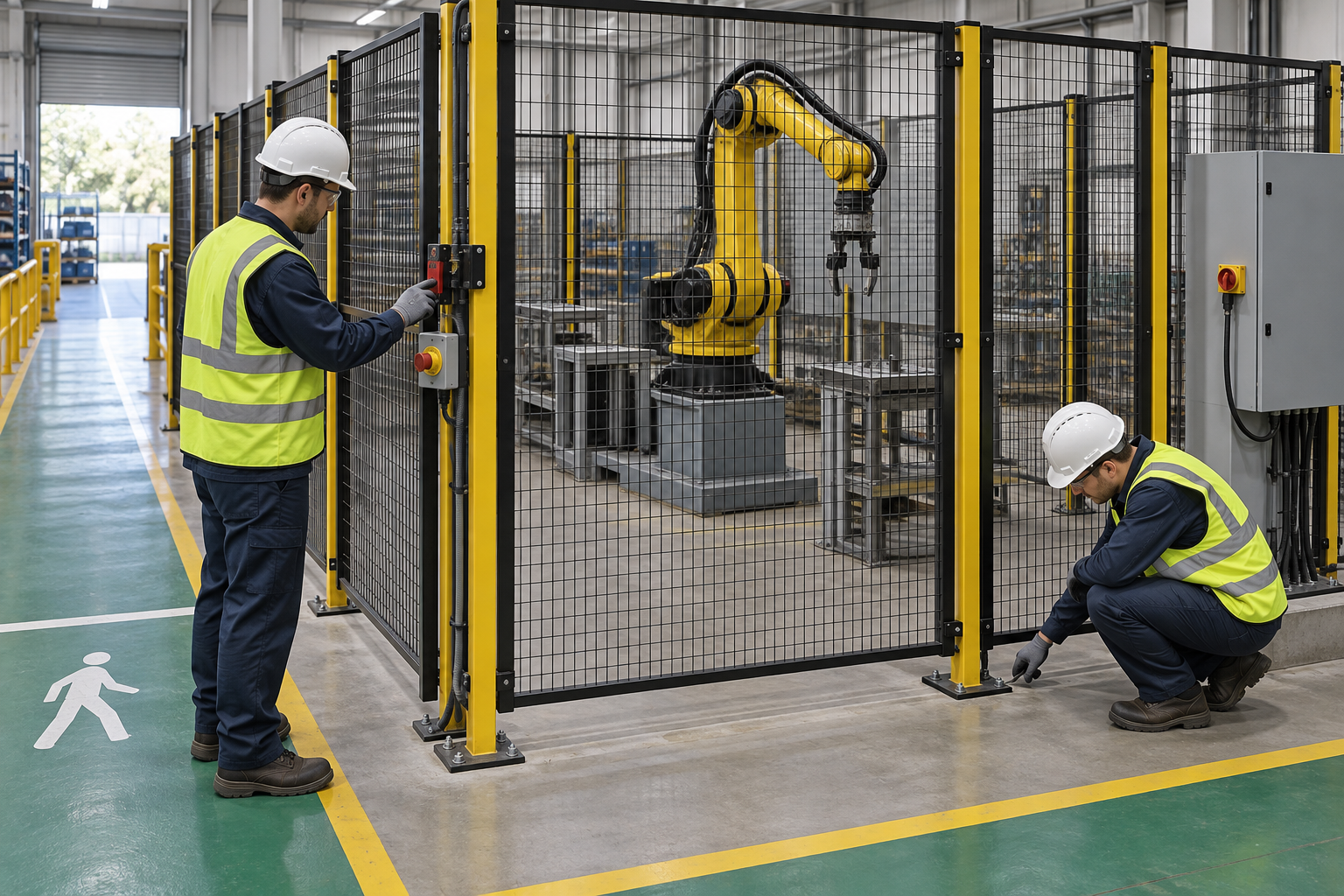
The retained illustration is an AI-generated educational image from the Korean source. It is not an actual incident photograph, approved drawing, equipment certification or proof that the depicted arrangement is safe.
Robot reach alone does not define the hazard space. Tool/workpiece projection, external axes, conveyors, stopping motion and ejection can change the required safeguarding.
An interlock stop, emergency stop and energy isolation serve different purposes. Installation/service access needs appropriate isolation and stored-energy support; powered teaching/testing needs its separately assessed mode and controls.
Gate status describes the gate, not the people inside. Reset must not become an unintended start command. Check blind areas, access accountability, escape and integrated-equipment responses before release.
Reduced-speed manual motion can still trap someone against a fixed object. An enabling device does not replace safe clearance and exclusive control. Reassess affected safety functions after tool, program or setting changes.
Hypothetical decision example
Hypothetical example: a teacher remains inside the cell while an outside worker sees the gate-closed indication and reaches for reset. Reset/start is held until people, control ownership and escape are confirmed and the planned safety-response tests are completed.
The example is fictional; no incident, measurement, inspection or approval is asserted.
Task flow: Assess complete cell → Isolate and support → Inspect floor and parts → Install fence and gate → Verify safety circuits → Teach and function test → Hold defect or change → Release to production
5. Hold and proceed decisions
| Condition | Action | Evidence | Proceed when |
|---|---|---|---|
| Energy boundary unclear | Hold service access | All equipment and stored-force evidence | Isolation verified |
| Gate/fence incomplete | Exclude unfinished zone | Anchors, gaps and escape checks | Safeguard installed |
| Reset response unknown | Hold production | Expected/actual safety tests | Restart logic verified |
| Person unaccounted for | No reset/start | Area search and access reconciliation | Area released |
Similar observation, different conclusion
| Observation | Supported conclusion | What remains unresolved |
|---|---|---|
| Gate indicates closed | Gate state observed | No proof the cell is empty |
| Robot stopped once | One stop occurred | All required safety functions unproved |
6. Roles and supervision
| Role | Responsibility |
|---|---|
| Work supervisor | Coordinate assess complete cell, affected operations, stop signals and stage transitions. |
| Technical/equipment reviewer | Verify Tool/work envelope, Integrated equipment, actual instructions and unresolved technical limits. |
| Task crew | Apply the stated controls, report changes and keep actual checks and signatures factual. |
| Inspector/test lead | Connect Mode/speed evidence, Enabling/control owner to the required acceptance criteria. |
| Receiving authority | Accept the recorded restrictions, Operations/rescue briefing, Validation/receiver, and follow-up ownership. |
These are responsibility examples, not invented statutory credentials. Verify actual competence, training and authority for the assigned work.
Supervision and handover controls
| Stage | Management controls | Evidence |
|---|---|---|
| Plan review | 1. Assign technical owner2. Close task-specific questions3. Assess full hazard envelope | 1. Tool/work envelope2. Integrated equipment3. Escape/rescue plan |
| Competence | 1. Verify required competence2. Assign stop authority3. Isolate all energy sources | 1. Lockout/verification2. Training and task briefing3. Shared supply/conveyor |
| Prestart evidence | 1. Inspect actual equipment2. Link evidence to this stage3. Support panels during work | 1. Support/hand position2. Temporary boundary3. Gate/escape function |
| Change control | 1. Stop and secure the area2. Review affected controls3. Hold faulty application | 1. Isolation/no bypass2. Setup authority3. Change/test record |
| Shift handover | 1. Identify remaining restrictions2. Confirm receiving responsibility3. Reconcile people/tools | 1. Whole-area clearance2. Tool/program/speed limits3. Validation/receiver |
| Closeout | 1. Record defect disposition2. Archive factual evidence3. Reconcile people/tools | 1. Whole-area clearance2. Tool/program/speed limits3. Validation/receiver |
7. Hold points and record quality
| Hold point | Evidence before release | Actual record |
|---|---|---|
| HP-0 Start | Install fixed perimeter guarding and access doors, verify safety interlocks/circuits, conduct planned manual teaching and functional tests, and hand over for controlled production release. | |
| HP-1 Isolate and support | Lockout/verification; Gravity/work support; Air/hydraulic state; Shared supply/conveyor | |
| HP-2 Install fence and gate | Support/hand position; Temporary boundary; Anchor installation; Gate/escape function | |
| HP-3 Hold defect or change | Isolation/no bypass; Setup authority; Axis/work support; Change/test record | |
| HP-4 Release to production | Whole-area clearance; Tool/program/speed limits; Operations/rescue briefing; Validation/receiver |
Hold points are internal evidence gates. They do not establish that a statutory permit exists or has been approved. Recheck affected gates after changes, faults and shift handover.
Record comparison - hypothetical templates
The 16 boxes below identify record elements, not completed checks or approvals. They are static symbols. Link equipment/location, date, actual findings and the separate record reference; preserve unresolved items.
| Record | Insufficient entry | Required record elements |
|---|---|---|
| Assess complete cell | "Checked" without supporting facts | □ Tool/work envelope□ Integrated equipment□ Stopping/distance basis□ Escape/rescue plan |
| Inspect floor and parts | "Checked" without supporting facts | □ Substrate/anchor basis□ Service locations□ Panel condition□ Height/gap/distance |
| Verify safety circuits | "Checked" without supporting facts | □ Circuit/version□ Reset/start response□ Bypass review□ Gate/sensor coverage |
| Hold defect or change | "Checked" without supporting facts | □ Isolation/no bypass□ Setup authority□ Axis/work support□ Change/test record |
8. Pre-work checks and emergency response
| Check required | Result | Checker/action |
|---|---|---|
| Assess complete cell: Tool/work envelope | ||
| Isolate and support: Lockout/verification | ||
| Inspect floor and parts: Substrate/anchor basis | ||
| Install fence and gate: Support/hand position | ||
| Verify safety circuits: Circuit/version | ||
| Teach and function test: Mode/speed evidence | ||
| Hold defect or change: Isolation/no bypass | ||
| Release to production: Whole-area clearance |
Stop work
Hold installation access for uncertain isolation, gravity-axis support or residual pressure. Stop tests/production for unexpected motion, bypasses, competing control, an unaccounted person or unverified safety response.
Emergency response
Use the planned safe stop and summon the site robot-rescue response. Do not enter an active cell, bypass a gate or restart motion to free a person. Qualified responders must establish electrical, pneumatic, hydraulic and gravity-energy control, including supported axes/workpieces, before access. Call 911 for serious crushing injury and provide cell location, current mode, trapped-person position and stored-energy information.
9. Official sources and review limits
Official public-source check: October 13, 2026. The review concerns the selected passages described below, not endorsement of this article.
| Official source | Checked scope and limit |
|---|---|
| OSHA 29 CFR 1910.212 | Selected machine guarding requirements; the complete robot application must protect exposed workers. |
| OSHA 29 CFR 1910.147 | Covered installation/service energy control and testing transitions; emergency stop alone is not energy isolation. |
| OSHA Technical Manual: Industrial Robot Systems | Selected risk assessment, integrated hazards, safety validation and manual mode/enabling/reduced-speed discussion. Technical guidance; actual system and standards assessment still required. |
| OSHA State Plans | Federal baseline and State Plan coverage reviewed. Confirm the applicable state program and employer coverage; this edition does not establish nationwide compliance. |
Selected public official provisions were checked on October 13, 2026. This is not a complete legal audit. No actual equipment manual, site measurements, engineering calculations, product certification or professional technical approval was supplied. Full paid NFPA/ANSI standards and state/local amendments were not reviewed. Check actual equipment, jurisdiction and project requirements before use.
This is reference content written and revised with AI. It has not been verified or approved by a professional. Review by a suitably qualified professional and required site authorization are necessary before use.
10. PDF use and frequently asked questions
PDF A summarizes core controls; B emphasizes technical failures; C covers supervision, records and handover. Each uses six stages from or aligned with the eight-stage body. All actual risk, measurement, check and signature fields are blank. Use a separate linked record where more space is needed.
Does emergency stop authorize fence installation?
No. Verify the appropriate hazardous-energy isolation and support of axes and workpieces.
Does slow mode remove crushing risk?
No. Preserve safe clearance, assessed manual mode, enabling control and control ownership.
Can reset also start production?
Verify a deliberate separate start process and protection against unexpected restart, together with a cleared cell.
Does a tool-only change need review?
Yes when it affects reach, mass, movement, stopping or other hazards; verify the affected functions before use.
Has a professional approved this JSA?
This is reference content written and revised with AI. It has not been verified or approved by a professional. Review by a suitably qualified professional and required site authorization are necessary before use.
11. Authorship and revision history
This is reference content written and revised with AI. It has not been verified or approved by a professional. Review by a suitably qualified professional and required site authorization are necessary before use.
| Date/version | Editorial history | Technical approval |
|---|---|---|
| September 19, 2026 / Korean v1.1 | Korean source: retained previously displayed draft version and source-check date; no professional review record asserted. | Professional technical approval not performed |
| September 26, 2026 / Korean v1.2 | Korean source: revised task decisions, record checklists, JSA and three PDFs; editorial/source and layout checks. | Professional technical approval not performed |
| October 14, 2026 / US v1.0 | US localization: Retains closed-gate versus personnel-clearance case, full cell envelope, reset/start separation and distinct maintenance/test states. Uses OSHA robot guidance without claiming a universal reduced speed, fence dimension or complete ANSI/RIA validation. | Not performed |
Source topic: https://smartjsabridge.com/ko/case-study/jsa-robotcell-setup
Content group: jsa-robotcell-setup